26 October 2026 · 4 min read
AI automation: which processes a small business can automate and what it costs
The processes a small business can automate with AI today, how it's done step by step and what it really costs: from €990 setup and €149/month.
AI automation means having a program do tasks for you that used to need a person, because something had to be read, understood or decided: an email, a PDF, a handwritten order. In a small business, the things most often automated are email, orders, invoices, payment collection and customer follow-up. A first process costs from €990 setup and €149/month and pays for itself within a few months if it saves a few hours a week.
How it differs from traditional automation
Traditional automation (macros, email rules, tools such as Zapier or n8n) follows fixed steps: "if an email arrives with this subject, move it to this folder". It works very well when the data always arrives in the same form.
AI automation adds understanding. An order can arrive as text in the body of an email, as a PDF or as a photo of a delivery note, and the AI understands it all the same. It can pick up on the tone of an angry customer, decide whether an invoice is a materials or a software expense, or write a reply tailored to each case. That opens up tasks to automation that used to be impossible to automate.
10 processes a small business can automate with AI
- Sorting email: separating what matters, notifications, marketing and spam, and only alerting you to what's important.
- Answering frequently asked questions: lead times, prices, order status. The agent drafts the reply and you approve it, or it sends it on its own if it's routine.
- Entering orders into the ERP: reading the order (text, PDF or Excel), recognising the customer and items, and leaving it ready to approve.
- Recording supplier invoices: reading the invoice, extracting amounts and VAT, and categorising it.
- Reconciling the bank: importing the statement and matching each transaction with its invoice.
- Chasing payments: spotting overdue invoices and writing to the customer in the right tone.
- Sales prospecting: finding companies that fit, writing the first email and the follow-ups.
- Booking meetings: suggesting free slots, sending the invitation and reminding people of it.
- Preparing quotes: a PDF draft based on the conversation with the customer, ready to review.
- Reports: a daily or weekly summary of sales, customers and pending tasks, without anyone having to put it together.
How do you set up AI automation?
Step by step:
- Choose a process that comes up a lot and follows more or less the same steps every time. Better one that annoys you daily than one that looks impressive.
- Measure how long it takes today: hours a week and who does it.
- Connect the tools involved: email, the ERP or CRM, the bank.
- Set the limits: what the agent does alone and what it asks you. At first, have it ask about almost everything.
- Test it with real data for a few weeks, reviewing what it proposes.
- Give it autonomy over what it always gets right, and move on to the next process.
How much does AI automation cost?
In the Spanish market, prices range from a few hundred euros for a simple automation to several thousand for a system connected to the CRM or ERP, plus a monthly fee for AI usage and maintenance. Our launch prices, excl. VAT:
- One specific process (email, orders, invoices or sales follow-up): from €990 setup and €149/month.
- Several departments connected to your CRM or ERP, with reports: from €2,900 and €290/month.
- A personal assistant for your email and calendar: from €190 and €39/month.
The fee covers the server, AI usage, maintenance and adjustments. Before we start, you get a fixed written quote.
Does it pay off?
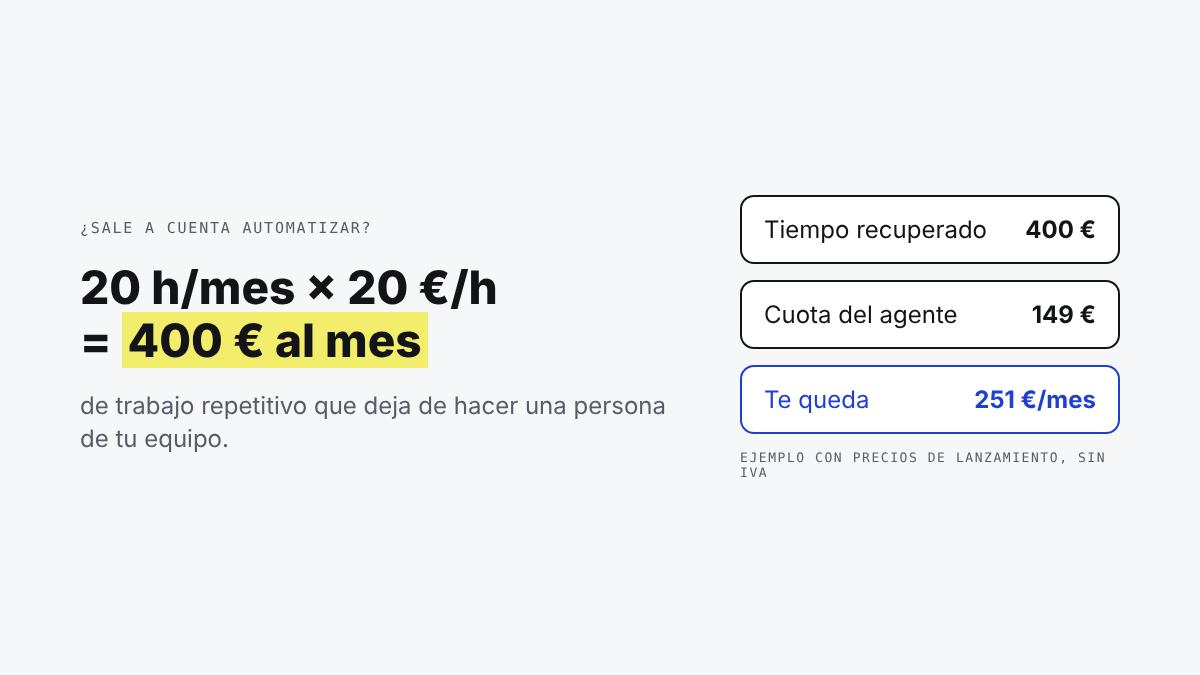
Run the numbers with your own figures: if an automation saves 20 hours a month for someone whose work costs €20 an hour, that's €400 a month of time recovered against a €149 fee. The setup cost is recovered in about four or five months. With our hours calculator you can see it for your own case in a minute.
Common mistakes when starting out
- Trying to automate everything at once. One process that works well beats five half-done.
- Letting the AI act alone from day one. For the first few weeks, have it propose and you approve.
- Choosing the tool before the process. First decide what you want off your plate; the technology comes after.
- Not measuring. If you don't know how many hours it used to take, you won't know whether it was worth it.
Where to start
If you know which task takes up most of your time, tell us about it and we'll come back with concrete ideas for your case. If you'd like to understand better how it works, start with what an AI agent is or see how we build AI agents for business. If you run an accounting firm, see AI for accounting firms and gestorías (accounting and tax agencies).