26 October 2026 · 3 min read
Claude for business: how to connect it to your CRM, email and ERP with MCP (real case)
What MCP is, why connect Claude to your company's data and how we use it at balderas.studio: CRM, email, finance and website from a single conversation.
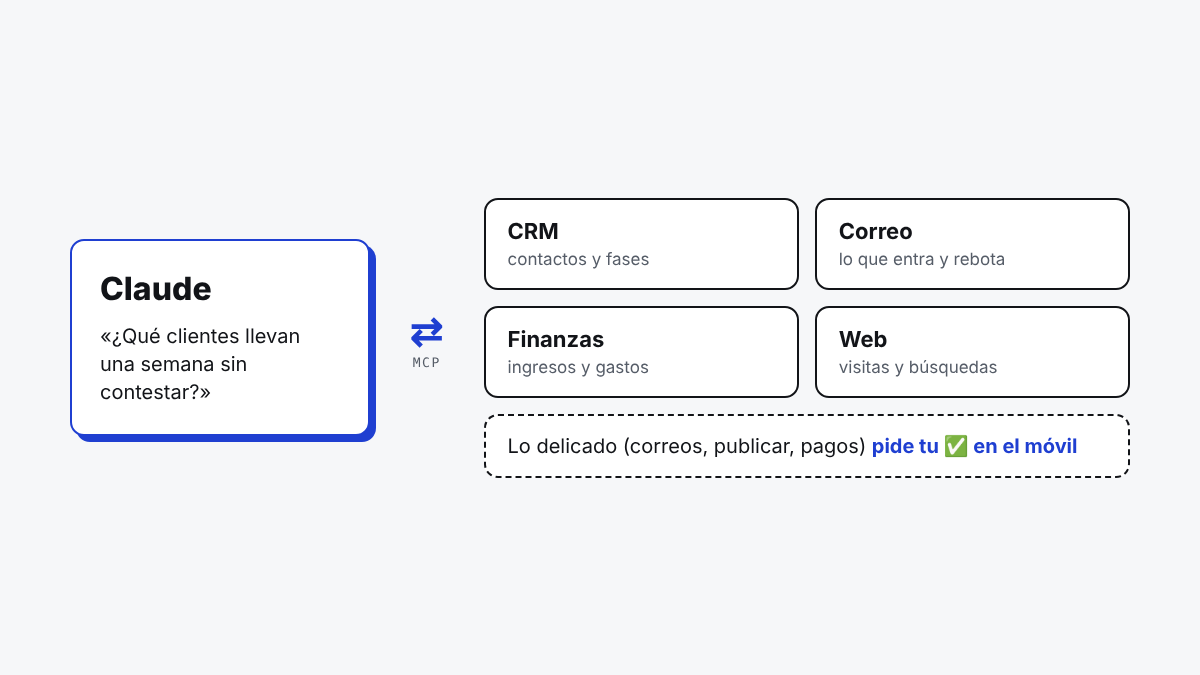
MCP (Model Context Protocol) is the open standard that lets Claude use other software: read your CRM, check your email, look at your finances or write on your website, always with the permissions you give it. For a business, it means you can ask Claude "which customers haven't replied for a week?" and get an answer based on your real data, not guesswork. At balderas.studio we use it every day to work on our own business.
What MCP is, in plain terms
On its own, Claude only knows what you tell it in the conversation. MCP is a standard way of giving it tools: each program in your business publishes an "MCP connector" with what Claude can do in it (list customers, read an email, create a draft…). Claude sees those tools and uses them when it needs them to answer or to do what you ask.
The key thing is that you decide which tools exist and what needs your approval. A connector can let Claude read the CRM but not delete anything, or draft an email but not send it without your permission.
What Claude connected to your business is good for
- Querying your data in plain language: "how much have we invoiced this quarter?", "which quotes are still unanswered?".
- Preparing work with real data: a report, an email to a customer with their history in front of it, or a quote based on the last conversation.
- Acting within limits: updating a CRM record, booking a meeting or publishing a draft on the website, asking for approval on anything sensitive.
Our real case
balderas.studio runs on a team of AI agents, one per department, that work on their own from Telegram. On top of that, the whole system publishes an MCP connector, so from Claude we can:
- See the CRM: contacts, what stage each one is at and their history.
- Review email: what has arrived, what has bounced and what's pending.
- Check finance: income, expenses and the monthly summary.
- Manage the website: write drafts, see visits and the Google searches people find us through.
- Research keywords with real Google data.
Anything sensitive still asks for approval: if we draft an email to a customer from Claude or want to publish an article, the approval button reaches our phone. This very article was written that way: from Claude, with the search data in front of us, and published with a button.
Claude for business: which plan you need
Claude's paid plans (Pro, Max, Team and Enterprise) let you add MCP connectors, and they can also be used via the API when agents work on their own on a server. For teams, the Team and Enterprise plans add centralised administration. The part that has to be built is the connector: deciding what data and actions each program exposes, and with what permissions.
What to bear in mind before connecting it
- Start with reading, not writing: a read-only connector already adds a lot of value with no risk.
- Minimum permissions: each tool gets only what it needs.
- Approval for anything that goes out: emails, payments or publications, always with your ✅.
- Log everything: what Claude did, when and why.
Want it for your business?
We build MCP connectors and custom AI agents so your team can work with Claude on its own data. See how we build AI agents for business, learn what an AI agent is or tell us about your case.